AI-native appointment booking for WordPress
Your front desk, handled — before the phone even rings.
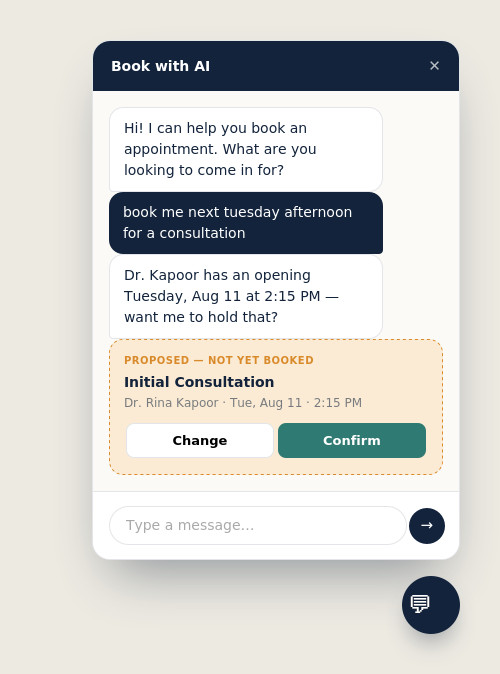
RudWexa AI Appointment Suite books appointments through natural conversation, not just a form. A customer types “book me Tuesday afternoon” — the AI checks real availability, proposes a time, and only books it once they confirm.
Works alongside your existing theme · No coding required · Your choice of OpenAI, Gemini, or Claude
How customers actually book
Two ways in. One booking engine underneath.
Whether someone fills out the step-by-step form or just chats with the AI, every booking goes through the exact same conflict-checked, timezone-safe engine — nothing gets double-booked, and nothing gets created without a real confirmation.
01 — THE FLAGSHIP FEATURE
An AI receptionist that actually books, not just chats
Most “AI chatbots” answer questions and hand the customer off to a form. This one finishes the job — it checks real availability, proposes a specific slot, and only creates the booking after the customer explicitly confirms it.
- Understands natural language: “next Tuesday afternoon,” “same time as last week”
- Always checks live availability before suggesting a time — never guesses
- Stages a proposal; the customer’s confirm click is what actually books it
- Falls back gracefully to the standard form if anything goes wrong
02 — THE BOOKING FORM
A modern step-by-step wizard for everyone else
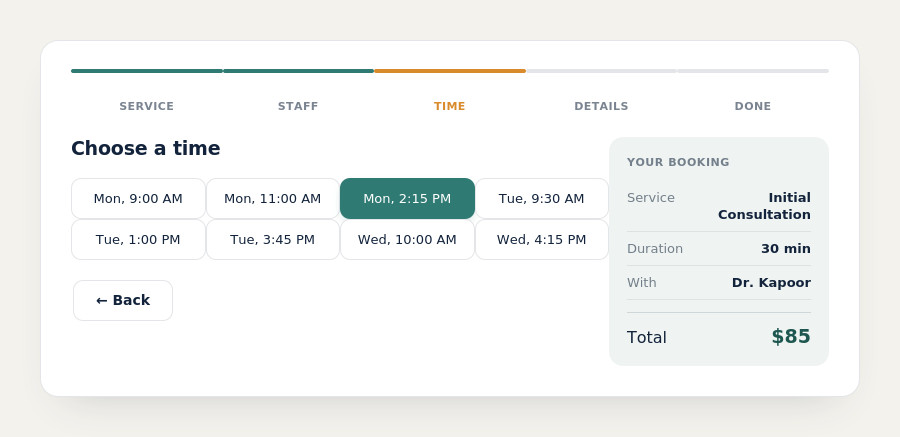
Not every customer wants to chat with an AI — some just want a form. The traditional wizard is right there too, with a live “Your booking” summary that fills in as they go, so they always know exactly what they’re about to confirm.
- Service → Staff → Time → Details → Confirmed, in a clean card layout
- Live summary panel shows service, staff, time, and total as it’s chosen
- Fully responsive — collapses to a single column on mobile
- Same conflict-checked booking engine as the AI chat
03 — YOUR AI, YOUR CHOICE
OpenAI, Gemini, or Claude — pick one, switch anytime
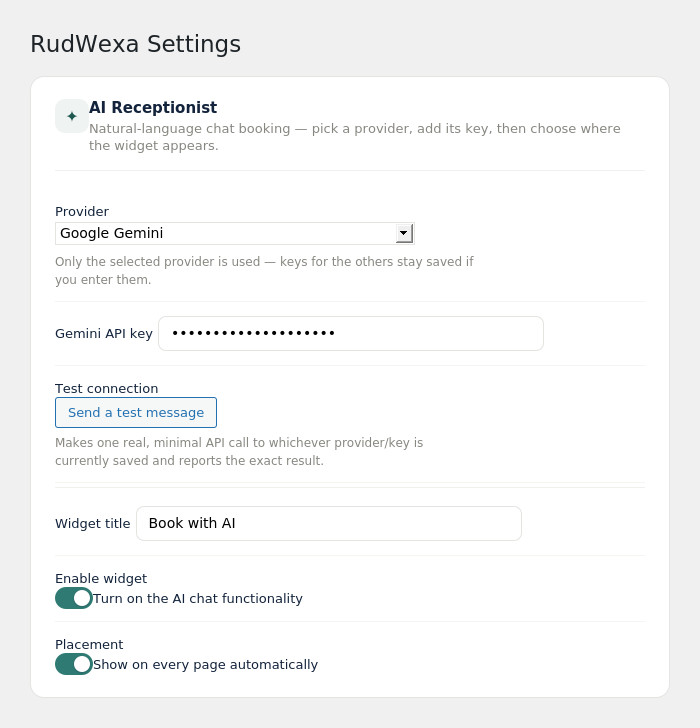
The AI receptionist isn’t locked to a single provider. Choose whichever you already have a key for, or whichever is cheapest for your volume — the booking logic and safety rules behave identically no matter which one is running underneath.
- Separate saved keys per provider — switching never means re-entering everything
- One-click “Test connection” reports success or the exact failure reason
- Custom persona and business knowledge base the AI can reference
- Booking-safety rules are never overridable by that custom text
04 — RUNNING THE BUSINESS
An admin dashboard built for a real front desk
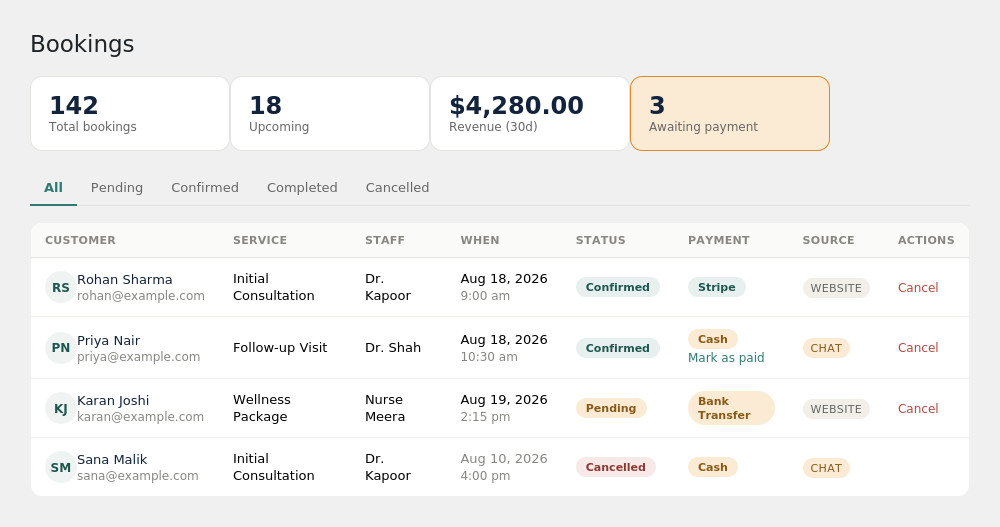
Revenue, upcoming bookings, and who still owes a payment — at a glance, not buried in a spreadsheet-style table. Filter by status, mark offline payments as received, and see at a glance whether a booking came from the website or the AI chat.
- Stat cards: total bookings, upcoming, 30-day revenue, awaiting payment
- Status filter tabs and color-coded badges for booking and payment state
- One-click “Mark as paid” for cash and bank-transfer bookings
- Source tag shows whether a booking came from the website or AI chat
Everything else, built in
The details that make it feel finished
Timezone-safe scheduling
Every booking is stored in UTC and converted for display — staff hours, customer confirmations, and the AI’s own date reasoning all agree.
Email, SMS & WhatsApp
Automatic booking confirmations by email, with optional SMS or WhatsApp reminders sent ahead of the appointment via your own Twilio account.
Offline payments, no gateway needed
“Pay at appointment” and bank transfer both work out of the box — no Stripe account required to start taking bookings.
Per-staff availability
A modern toggle-switch grid for weekly hours, plus time off and vacation windows — set once per staff member, respected everywhere.
Editable message templates
Every email and text the plugin sends is yours to rewrite, with placeholder tokens for customer name, service, staff, and time.
A real setup wizard
Activate the plugin and you’re walked through timezone, payment options, and your AI provider in three short steps — not a blank settings page.
Setup
Live in under ten minutes
This is a real sequence — each step depends on the one before it.
Install and activate
Upload the plugin through Plugins → Add New, or drop the folder into wp-content/plugins. Activation creates everything the plugin needs automatically.
Run the setup wizard
You’re redirected straight into a 3-step wizard: business timezone and payment options, then an optional AI provider key, then you’re done.
Add your services and staff
Name, duration, and price for each service; then staff members with their weekly hours set in the toggle-switch availability grid.
Drop the shortcodes in
[rudwexa_booking] for the wizard, [rudwexa_chat] for the AI receptionist — on any page, or site-wide with one setting.
You’re live
Real bookings start flowing into the same dashboard, whether they came from the form or from a conversation with your new AI receptionist.
Stop losing bookings to a form nobody wants to fill out.
Install RudWexa AI Appointment Suite and let customers book the way they’d rather — by just asking.