Keep Your WordPress Background Processes Under Control
Your WordPress website runs important tasks behind the scenes.
WooCommerce processing, scheduled emails, subscription renewals
and other background jobs depend on these tasks running correctly.
But what happens when scheduled events become overdue, background
actions fail or your processing queue starts growing?
TaskBeacon Pro brings WP-Cron monitoring, Action Scheduler
monitoring and intelligent diagnostics together in one dashboard.
Understand what’s happening, identify common failure patterns
and know where to investigate.
Why TaskBeacon Pro?
Basic task lists can tell you that an action failed or is overdue.
But finding out what might have gone wrong often requires checking
different screens, logs and WordPress settings.
TaskBeacon Pro combines monitoring and diagnostic information
so you can investigate background-processing problems from one place.
Monitor Two Important WordPress Systems Together
- WP-Cron: Monitor scheduled WordPress events and identify overdue events.
- Action Scheduler: Track pending, overdue, failed and completed background actions.
Go Beyond Failed and Pending Counts
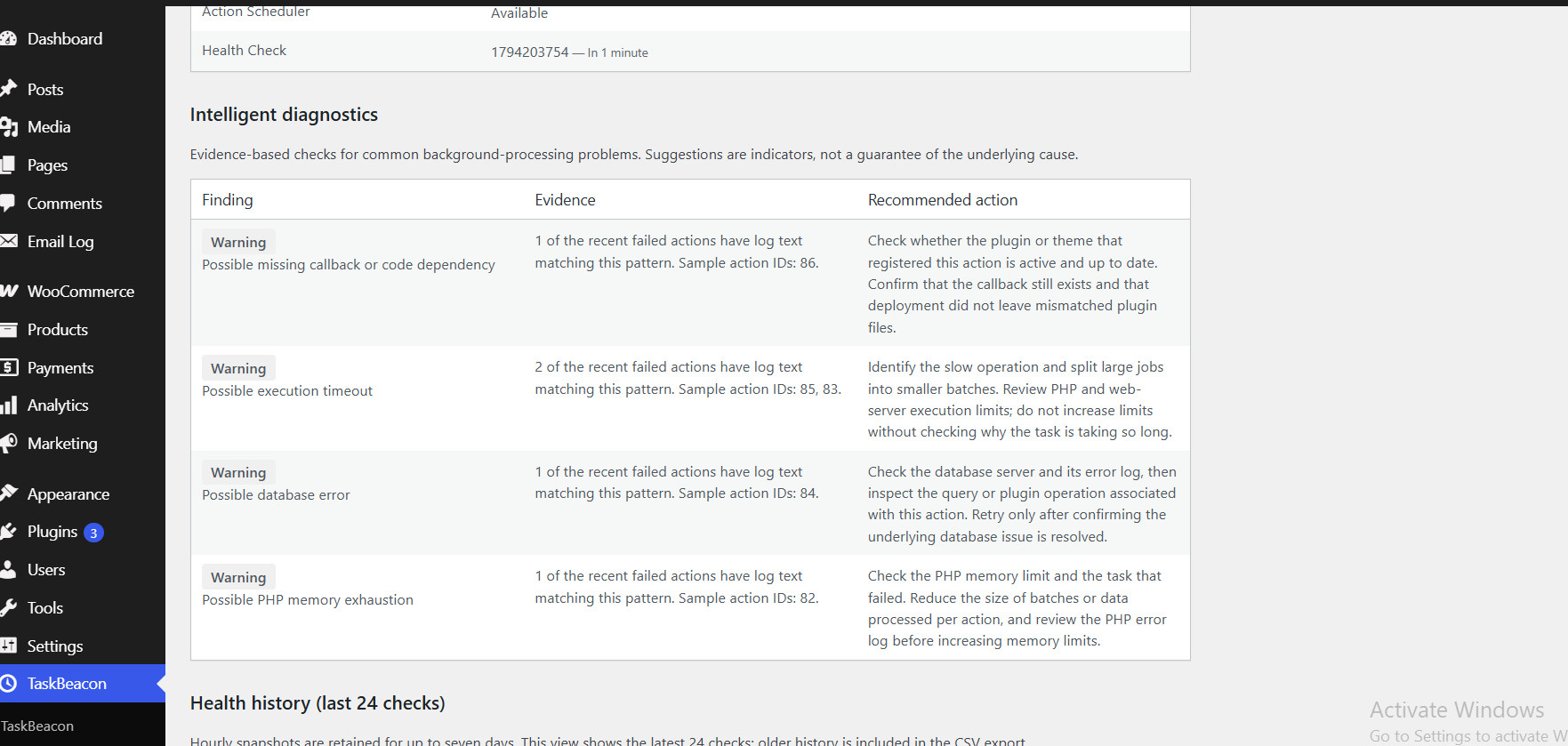
TaskBeacon Pro includes intelligent diagnostic checks that examine
recent failed-action log messages for common failure patterns.
- Possible PHP memory exhaustion
- Possible execution timeouts
- Possible database errors
- Possible network errors
- Possible missing callbacks or code dependencies
Each finding includes supporting evidence and a recommended
investigation step. These are diagnostic indicators, not
guaranteed identifications of the underlying cause.
See Your Background Process Health
- View important monitoring statistics in one dashboard.
- Review health history over time.
- Check relevant WordPress and server environment information.
- Run a health check when you need an updated assessment.
Stay Informed with Email Alerts
Configure a failed-action threshold and receive an email notification
when that threshold is reached. You don’t have to keep checking
your WordPress dashboard throughout the day.
Export Diagnostic Information
Export diagnostic information as a CSV file to help with further
investigation, troubleshooting and developer handover.
See TaskBeacon Pro in Your WordPress Dashboard
TaskBeacon Pro provides a dedicated dashboard for monitoring
scheduled events, background actions, environment information
and diagnostic findings.
Who Is It For?
- WooCommerce store owners: Keep an eye on background jobs used by your store.
- WordPress developers: Investigate scheduled task failures and common error patterns.
- Website administrators: Monitor background activity from one place.
- WordPress agencies: Get useful diagnostic information when investigating client websites.
TaskBeacon Free vs TaskBeacon Pro
TaskBeacon Pro builds on the free TaskBeacon monitoring foundation
with additional diagnostic and management capabilities.
- Intelligent failure diagnostics
- Detailed WordPress environment diagnostics
- Background-process health history
- Configurable email alerts
- CSV diagnostic export
- Expanded monitoring dashboard
Simple Annual Pricing
$9.90 USD per year – One WordPress website.
- One website licence
- Automatic yearly subscription renewal
- Plugin updates while your subscription is active
- Licence key activation
Ready to get a clearer picture of your WordPress background processes?
Get TaskBeacon Pro – $9.90/year
Monitor. Diagnose. Stay Informed.